COMPANY NEWS
Why Manual Anilox Roller Cleaning Is Not Enough for Stable Flexo Printing
Why Is Print Quality Still Unstable After Manual Anilox Roller Cleaning?
In flexo printing, many factories face a frustrating problem:
The anilox roller is cleaned every day, and operators are following the normal cleaning process. However, print color still becomes lighter over time, solid areas are not full enough, color density is unstable, and the same job may show inconsistent results during production.
When this happens, many printers first check the ink, doctor blade, printing plate, pressure or machine settings.
But one important cause is often overlooked:
An anilox roller may look clean on the surface, but the cells inside may still be clogged.
In flexographic printing, the anilox roller is not just a roller that transfers ink. It is a precision ink-metering component. The engraved cells on the roller surface are designed to carry and transfer a controlled amount of ink to the printing plate.
Once these cells are blocked by dried ink, varnish, coating, adhesive or other residue, the actual ink transfer volume decreases. As a result, the print may become weak, uneven or unstable.
That is why manual cleaning may not always be enough, even if the roller looks clean from the outside. For factories that need stable long-term print quality, a professional anilox roller cleaning machine can help make roller maintenance more consistent and effective.
Manual Cleaning Is Useful, But It Has Clear Limitations
Manual cleaning is still an important part of daily anilox roller maintenance. Cleaning the roller in time after production can help reduce ink drying and prevent serious cell plugging.
However, in real production, manual cleaning is often difficult to keep stable and thorough over a long period of time.
This is especially true when a factory uses high-LPI anilox rollers, UV ink, fast-drying ink, water-based ink, varnish, coating or adhesive. These materials can easily remain inside the small engraved cells. The roller surface may look clean, while residue is still left deep inside the cells.
This type of clogging may not be obvious at first. But as production continues, the effective volume of the anilox roller gradually decreases, and print quality becomes harder to control.
Why Manual Anilox Roller Cleaning May Not Be Enough
1. Residue Inside the Cells Is Difficult to Remove by Surface Wiping
The key structure of an anilox roller is its fine engraved cells. Once ink or coating dries inside these cells, it is difficult to remove completely with only a cloth, brush or common cleaning solution.
High-LPI anilox rollers have smaller and denser cells, which makes manual cleaning even more difficult. In many cases, manual cleaning removes contamination from the surface but does not fully clean the deeper cell area.
This leads to a common situation:
The roller looks clean, but the printed color is still weak.
2. Cleaning Quality Depends on Operator Skill
Manual cleaning is affected by many factors, including operator experience, cleaning time, cleaning pressure, tools and cleaning agents.
Different operators may clean the same roller in different ways. Even the same operator may clean more carefully at one time and more quickly at another time when production is busy.
This creates unstable cleaning results.
For label printing, flexible packaging, paper printing and coating applications where color consistency is important, unstable cleaning can directly lead to unstable print quality.
3. Incomplete Cleaning Reduces Effective Anilox Volume
Anilox volume determines how much ink the roller can carry and transfer.
When some cells are clogged, the roller may still rotate normally, but fewer cells are actually transferring ink as designed. This causes the effective volume to decrease.
Common results include:
- Lighter print color
- Poor solid coverage
- Unstable color density
- Uneven ink transfer
- Frequent adjustment of ink or pressure
- More waste during production
In many cases, operators try to solve the problem by increasing pressure, adjusting ink viscosity or changing press settings. These adjustments may help temporarily, but they do not solve the real problem if the anilox cells are clogged.
4. Incorrect Manual Cleaning Can Damage the Roller
Manual cleaning can also create risks if the wrong tools or methods are used.
Hard brushes, metal tools, unsuitable chemicals or excessive force may damage the roller surface. Ceramic anilox rollers have good wear resistance, but they still require proper maintenance.
Once the roller surface is scratched or the cell structure is damaged, the print may show fixed lines, uneven transfer or long-term defects.
These problems cannot be solved by cleaning again.
5. Manual Cleaning Takes Time and Labor
If a factory uses many anilox rollers, changes colors frequently or handles many short-run jobs, manual cleaning becomes a regular workload.
If cleaning takes too long, it affects job changeover efficiency.
If cleaning is done too quickly, the result may not be good enough.
For flexo printers that need continuous production, anilox roller cleaning is not only a maintenance issue. It also affects production efficiency.
What Printing Problems Can Be Caused by Poor Anilox Cleaning?
When anilox cells are clogged or not fully cleaned, the most direct effect is reduced ink transfer.
This can cause several printing problems:
- Print color becomes lighter over time
- Color density is inconsistent
- Large solid areas look weak or dry
- Fine details become unstable
- Streaks or uneven color appear
- Setup time becomes longer
- Ink waste and production waste increase
- Customers complain about color inconsistency
Some of these problems may look like ink problems, doctor blade problems or pressure problems. But in many cases, the root cause may be long-term insufficient anilox roller cleaning.
That is why the cleaning condition of the anilox roller should be checked carefully when troubleshooting flexo print quality issues.
When Should You Consider an Anilox Roller Cleaning Machine?
Not every factory needs a cleaning machine from the beginning. But if your production has one or more of the following situations, a professional anilox roller cleaning machine may be worth considering.
1. Print Color Is Still Weak After Manual Cleaning
If the anilox roller has been cleaned, but the print color still cannot reach the previous density, there may still be residue inside the cells.
2. Cleaning Results Are Not Stable
If the print result improves after cleaning sometimes but not every time, the manual cleaning process may not be consistent enough.
3. You Use High-LPI Anilox Rollers
High-LPI rollers have smaller cells and are more sensitive to plugging. They usually require more stable and careful cleaning.
4. You Often Use UV Ink, Varnish, Coating or Adhesive
These materials can be more difficult to remove once they remain inside the cells. Simple manual cleaning may not be enough for long-term production.
5. You Have Many Rollers or Frequent Color Changes
If several rollers need to be cleaned every day, manual cleaning increases labor pressure and may lead to inconsistent cleaning quality.
6. You Want to Reduce Setup Time and Waste
If operators often need to adjust color density, ink viscosity or pressure because of unstable printing, the roller cleaning condition may be an important area to improve.
What Can an Anilox Roller Cleaning Machine Help Improve?
The value of an anilox roller cleaning machine is not only to make the roller look clean. More importantly, it helps factories build a more stable and repeatable cleaning process.
Compared with manual cleaning alone, professional cleaning equipment can help:
- Improve cleaning consistency
- Reduce dependence on manual operation
- Remove residue from anilox cells more effectively
- Improve ink transfer stability
- Reduce print defects caused by clogged cells
- Shorten cleaning and job changeover time
- Reduce waste caused by repeated press adjustment
- Extend the usable life of anilox rollers
For flexo printers, a stable anilox roller condition means more stable color, less waste and higher production efficiency.
A Cleaning Machine Does Not Replace Maintenance — It Makes Maintenance More Stable
An anilox roller cleaning machine does not mean daily maintenance can be ignored.
A better approach is:
Clean the roller in time after production to prevent ink or coating from drying inside the cells.
Use professional cleaning equipment when manual cleaning can no longer restore stable ink transfer.
Inspect the roller surface regularly to check for wear, scratches or other damage.
In this way, roller cleaning becomes preventive maintenance instead of emergency troubleshooting.
For long-term production, preventive cleaning is often more effective than waiting until print defects appear.
How to Build a Better Anilox Roller Cleaning Process
To keep flexo print quality stable, factories should build a regular anilox roller cleaning and maintenance process.
Here are some practical suggestions:
- Clean the anilox roller soon after production
- Do not allow ink, coating or adhesive to dry inside the cells
- Choose the right cleaning method for the ink type
- Avoid hard brushes, metal tools or unsuitable chemicals
- Check roller surface condition and ink transfer performance regularly
- Record cleaning frequency and print quality changes
- Use an anilox roller cleaning machine when manual cleaning is no longer consistent enough
When the cleaning process becomes more standardized, print quality becomes easier to control.
Why Choose Our Anilox Roller Cleaning Machine?
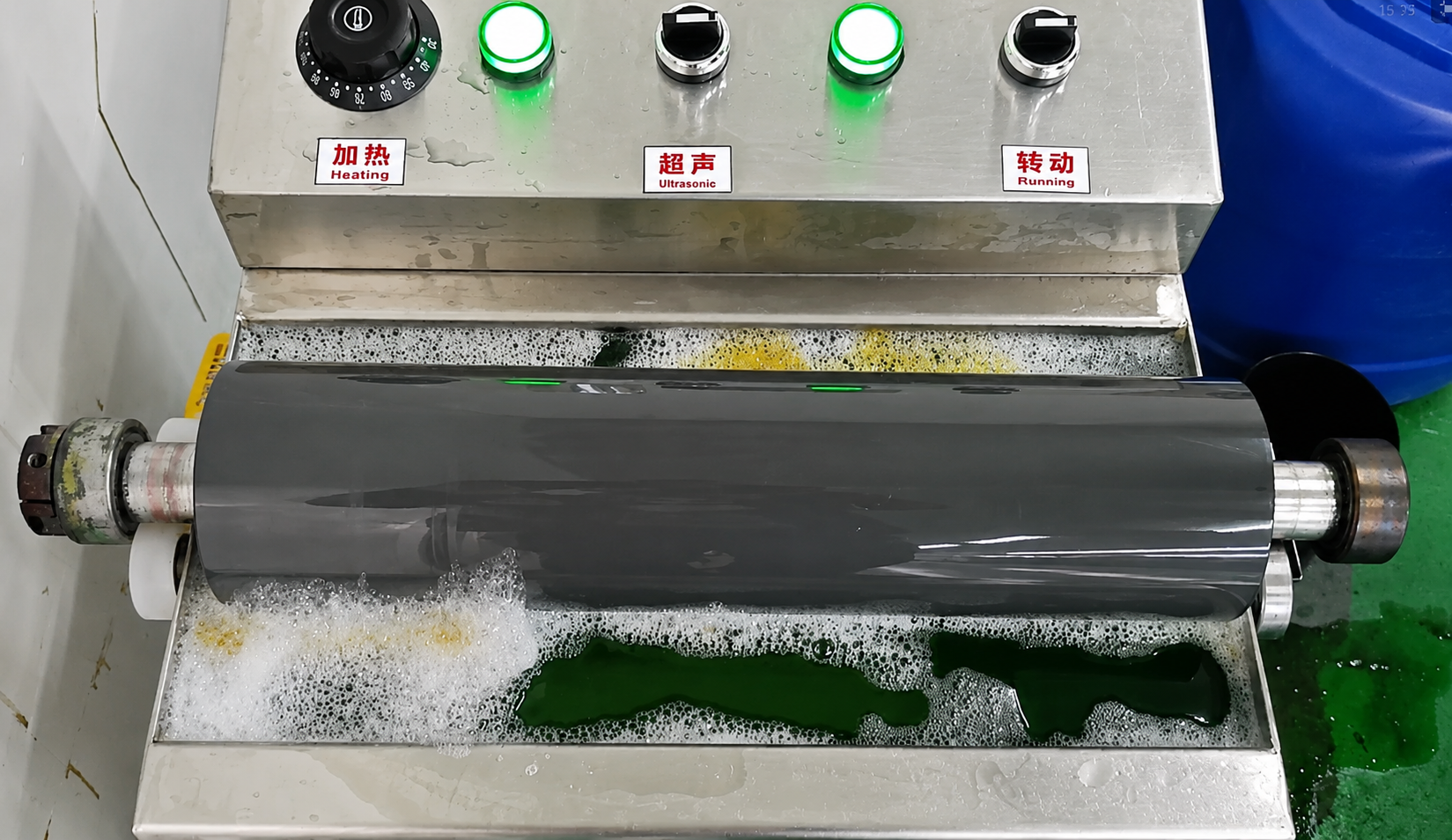
Our anilox roller cleaning machine is designed for flexo printing, label printing, flexible packaging, paper printing, coating and other production applications.
It is suitable for factories that want to improve anilox roller cleaning efficiency and maintain more stable print quality.
Our equipment helps reduce manual cleaning pressure, improve roller maintenance efficiency and solve ink transfer instability caused by clogged anilox cells.
Whether you want to improve color consistency, reduce cleaning time or build a more reliable roller maintenance process, we can recommend a suitable cleaning solution according to your production needs.
Conclusion: Stable Anilox Cleaning Supports Stable Print Quality
Manual cleaning is an important part of anilox roller maintenance, but it is not always enough.
When residue remains inside the cells, the roller may look clean from the outside while still causing weak color, poor solid coverage and unstable density during printing.
For flexo printers that need stable long-term production, anilox roller cleaning should not depend only on manual experience. A more consistent and repeatable cleaning process is important.
If your print quality is still unstable after manual cleaning, or if you want to reduce cleaning time, lower waste and improve ink transfer stability, a professional anilox roller cleaning machine may be the better choice.
Looking for a suitable anilox roller cleaning solution? Contact us today for professional recommendations.


